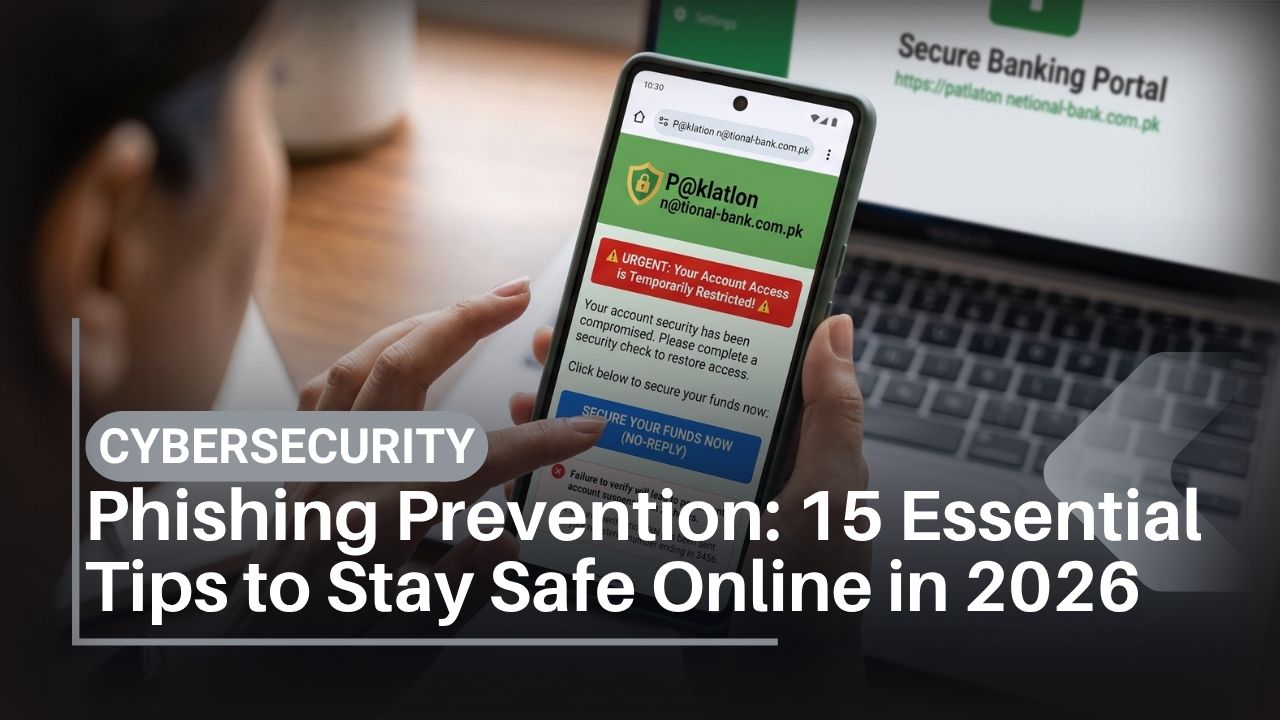
Phishing prevention has become more important in 2026 because scams no longer need to look amateurish. A fraudulent email can be grammatically perfect. A fake banking page can closely resemble the real one. An urgent WhatsApp message may come from a compromised account, while AI can make an impersonated voice or image considerably more convincing.
The basic objective, however, has not changed. Phishing tries to manipulate you into doing something useful to an attacker: revealing a password, sharing an OTP, approving a login, transferring money, opening a malicious attachment or installing unwanted software.
For smartphone users in Pakistan, phishing can arrive through email, SMS, WhatsApp, social media, QR codes, search results or phone calls. Attackers may impersonate banks, mobile operators, courier companies, online marketplaces, employers, universities, relatives or government agencies such as the Pakistan Telecommunication Authority (PTA).
Good phishing prevention therefore depends less on spotting spelling mistakes and more on verifying identity, domains and requests independently.
This guide provides 15 practical phishing prevention steps for Android and iPhone users, students, professionals and everyday consumers in Pakistan. It also explains smishing, vishing, QR phishing, AI impersonation, password security, malware risks and what to do after clicking a suspicious link.
For wider digital-security guidance, IT Magazine Pakistan’s 2026 cybersecurity guide covers account security, backups, mobile threats and recovery in more depth.
What Is the Best Way to Prevent Phishing?
The best phishing prevention method is independent verification combined with phishing-resistant authentication.
Do not use an unexpected message’s link or phone number to verify that same message. Instead, open the organization’s official app, type or use a trusted bookmark for its known website, or call a verified number obtained independently.
Use a password manager and passkeys or multi-factor authentication on important accounts. Never give another person your password, PIN, one-time password or account-recovery code simply because they claim to represent a trusted organization.
In 2026, do not use good grammar, a familiar voice, a company logo or HTTPS alone as evidence that a request is legitimate.
Key Takeaways
- Phishing is social engineering: the attacker usually tries to manipulate a person rather than directly defeat device encryption.
- Phishing can arrive through email, SMS, WhatsApp, calls, social networks and QR codes.
- AI can make scams more polished, so poor spelling is no longer a reliable warning sign.
- Verify sensitive requests through an independently obtained channel.
- Examine the actual domain name, not merely the logo or page design.
- Never share OTPs, passwords, PINs or recovery codes with an incoming caller.
- Passkeys and FIDO security keys provide strong protection against conventional credential phishing on supported services.
- SMS MFA is better than password-only security but can itself be phished.
- A VPN does not prevent you from entering credentials into a phishing website.
- If you already submitted a password to a suspicious site, change it promptly from the genuine service and terminate unknown sessions.
- Pakistan users should verify telecom, banking and government messages through official sources rather than links sent by strangers.
Table of Contents
What Is Phishing?
Phishing is a form of social engineering in which an attacker impersonates or imitates a trusted person or organization to persuade someone to reveal sensitive information or perform an unsafe action.
The general phishing definition covers several variations of this attack.
A typical phishing attack might try to obtain:
- Email credentials
- Banking details
- Credit/debit card information
- One-time passwords
- WhatsApp registration codes
- Social-media passwords
- Account-recovery codes
- Personal or identity information
Not every phishing attack asks for credentials. Some persuade users to transfer money directly, open malicious files or install remote-access software.
Phishing vs social engineering
Social engineering is the broader manipulation of people to bypass security controls. Phishing is one common type of social engineering.
That distinction explains why malware removal alone cannot solve phishing. If you voluntarily transfer money to a fraudster, there may be no malware on your phone at all.
Phishing Attack Types Compared
| Attack | Delivery method | Typical trick | Strong prevention |
| Email phishing | Fake login/security warning | Verify domain independently | |
| Smishing | SMS/message | Parcel, bank or SIM problem | Don’t follow unsolicited links |
| Vishing | Phone/voice call | Impersonated support/bank employee | Hang up and call official number |
| Spear phishing | Personalized message | Uses information about victim | Independent verification |
| QR phishing | QR code | Sends user to fake website | Inspect destination before acting |
| Social-media phishing | DM/post/ad | Fake support or prize | Open platform directly |
| MFA phishing | Fake sign-in page | Steals password + OTP | Passkeys/security keys |
| AI impersonation | Voice/image/video | Pretends to be known person | Trusted second-channel verification |
Several methods can be combined. For example, an SMS may direct you to a fraudulent site before an attacker calls pretending to be “support.”
1. Check the Sender, but Never Trust the Sender Field Alone
The name displayed on an email or message is a weak identity signal.
An email can display “Bank Security Department” while coming from an unrelated domain. Attackers can also compromise real accounts, meaning a message can genuinely originate from someone’s account while still being fraudulent.
Phishing prevention starts by separating the message from the identity it claims.
How to verify the sender
Examine the full email address or account details. Check whether the message is expected and whether its request is normal.
Then verify independently. If a message claims your bank account has a problem, open the bank’s official app rather than tapping the message link.
If an alleged university administrator requests payment through WhatsApp, contact the institution through contact details published on its official website.
The key rule is simple: never use information inside a suspicious communication as the only way to prove that communication is genuine.
2. Inspect the Real Domain Before Entering Information
Understanding domains is one of the most valuable phishing prevention skills.
Attackers often use names that look similar to legitimate websites. On a small smartphone screen, long URLs can make these differences difficult to notice.
How to check a URL
Consider a fictional example. A legitimate company might use:
company.com
A phishing site might use:
company.verify-example.com
The important registered domain in the second example belongs to “verify-example.com,” not “company.com.”
Attackers can also use misspellings, extra words and visually similar characters.
Never enter sensitive information merely because the page uses the right colors and logo.
Does the HTTPS padlock prove a site is safe?
No.
HTTPS protects communications between your browser and the domain it has connected to. Criminals can also obtain HTTPS certificates for phishing domains.
Encryption of a connection is not proof of the website owner’s honesty.
3. Treat Urgency as a Reason to Verify, Not to Hurry
Many phishing campaigns manufacture a deadline.
“Your account will be blocked in 30 minutes.”
“Pay this delivery charge immediately.”
“Your SIM will be disconnected today.”
“Your banking account requires urgent verification.”
The objective is to reduce the time you spend checking.
The 60-second phishing prevention rule
Before making an unexpected payment, revealing information or logging in through an unsolicited request:
- Stop interacting with the message.
- Identify who supposedly sent it.
- Open the organization’s official service independently.
- Check whether the warning appears there.
- Contact the organization using a known official channel if necessary.
Legitimate fraud-prevention systems can send genuinely urgent notifications, so urgency itself does not prove a scam. It means you should verify through an independent channel.
4. Never Share OTPs, Passwords, PINs or Recovery Codes
An authentication secret should remain secret.
If someone asks you to read out an OTP, WhatsApp registration code, banking PIN, password or recovery code, treat the request as a major warning sign.
Why OTP phishing succeeds
A fraudster may already know your username and password. The final barrier could be your one-time code.
The attacker then calls or messages you with a convincing story designed to make you provide it.
Read the full OTP message. Many legitimate services explicitly tell users not to share codes.
For Pakistani banking information, use the official State Bank of Pakistan and your financial institution’s own verified channels rather than advice from unknown callers.
5. Use Passkeys or Strong Multi-Factor Authentication
Good authentication can limit the damage when phishing prevention fails.
Multi-factor authentication requires additional authentication evidence rather than relying only on a password.
Not all MFA is equally resistant to phishing.
Password vs MFA vs passkeys
| Method | Can conventional phishing steal it? | SIM dependent? | Security use |
| Password | Yes | No | Baseline only |
| SMS OTP | Yes | Yes | Better than password alone |
| Authenticator OTP | Yes, through real-time phishing | No | Strong general MFA |
| Push approval | Sometimes | No | Read prompts carefully |
| Passkey | Highly phishing-resistant | No | Strong choice |
| FIDO hardware key | Highly phishing-resistant | No | Excellent for high-risk accounts |
A passkey is associated cryptographically with the legitimate service, making it substantially more resistant to fake login pages than a password.
For important accounts, choose the strongest authentication method the service and your recovery setup can support.
6. Use a Password Manager for Password Security and Phishing Defense
Password managers solve more than password reuse.
A good password manager associates credentials with the website they belong to. If a convincing fake domain does not match the genuine site, the manager may not automatically offer the expected login.
That is a useful warning.
Password-security checklist
Use a unique password for your primary email, Google Account or Apple Account, financial services and social media.
Do not manually reuse one memorable password everywhere.
If you discover that a password has been exposed, change it on the affected service and anywhere it was reused. Then eliminate that reuse permanently.
For wider smartphone account protection, see IT Magazine’s guide on how to protect your phone.
7. Recognize SMS and WhatsApp Phishing
Phishing delivered through SMS is commonly called smishing.
Mobile messages are effective because people often read them quickly and URLs are harder to inspect on small screens.
Common phishing themes in Pakistan
A scam may claim there is:
- An unpaid delivery charge
- A banking-security problem
- A SIM registration problem
- A PTA-related issue
- A prize or refund
- A job or scholarship offer
- An urgent request from a relative
- A social-media account violation
These are examples of themes, not evidence that every message about these topics is fraudulent.
If a message claims to concern telecom regulation, go directly to the Pakistan Telecommunication Authority or your operator’s genuine website rather than using the link in the message.
WhatsApp registration-code fraud
If you receive an unexpected WhatsApp verification code, never forward it because someone says it was “sent by mistake.”
Enable WhatsApp’s two-step verification and review linked devices periodically.
8. Defend Against AI Voice, Image and Video Impersonation
AI changes phishing prevention because appearance and sound are weaker identity signals than before.
Generative AI can produce synthetic speech, edited images and realistic-looking content. An attacker does not necessarily need a technically perfect deepfake; they only need something convincing enough during an urgent situation.
Family anti-impersonation procedure
For unexpected financial requests:
- End or ignore the incoming conversation temporarily.
- Call the person using an already-saved number.
- Ask for information appropriate to verifying the situation.
- Use a prearranged family verification phrase for emergencies.
- Do not transfer money solely because a voice sounds familiar.
Do not use public information such as a birthday as the family secret.
AI itself is not inherently malicious. It also has legitimate uses in fraud detection, spam filtering and security analysis. Readers interested in the broader technology can explore IT Magazine’s artificial intelligence coverage.
9. Treat Unexpected QR Codes as Links
A QR code hides the URL until you scan it, which makes it useful for attackers.
This technique is sometimes called QR phishing or “quishing.”
QR codes can appear in emails, printed notices, fake parking/payment messages or altered stickers placed over legitimate codes.
QR phishing checklist
Before entering credentials after scanning:
- Preview the destination URL when your device allows it.
- Check the domain carefully.
- Be suspicious if a QR code unexpectedly requests a login.
- For payments, verify the recipient displayed by the legitimate payment service.
- Navigate independently to the known service for account changes.
A printed QR code is not trustworthy merely because printing it required physical access to a location.
10. Be Careful With Attachments, APKs and Remote-Access Apps
Some phishing campaigns aim to install malicious software rather than steal a password directly.
An attacker may send an “invoice,” “parcel document,” Android APK or application described as a security update.
Android users
For ordinary consumers, Google Play should be the default app source. Google describes its scanning system through official Google Play Protect guidance.
Avoid unknown APK packages claiming to be bank, courier, PTA or update applications.
Android Developers provides authoritative mobile security guidance for technical readers.
Remote-control applications
Remote-support tools have legitimate purposes. The danger comes when a stranger persuades you to install one and then gains visibility or control while you access financial services.
Never install remote-control software simply because an unsolicited caller says it is required to “verify” your banking account.
If malicious software is already suspected, phishing response may also require malware remediation rather than only changing a password.
11. Protect Your Primary Google or Apple Account
Your primary identity account is often the recovery route for other services.
If attackers compromise Gmail or an Apple Account, they may gain access to messages, cloud information or password-reset links.
Google phishing prevention
Run the official Google Security Checkup, review devices, enable strong authentication and remove unknown account access.
Google’s Gmail and Chrome include anti-phishing protections, but automated defenses cannot catch every malicious message.
Apple phishing prevention
Apple users should maintain strong authentication and verify trusted devices and recovery information. Apple’s official phishing and social-engineering guidance explains how Apple recommends handling suspicious messages and calls.
No manufacturer can prevent every user from voluntarily disclosing credentials. Human verification remains part of account security.
12. Keep Android, iOS and Browsers Updated
Updates do not eliminate social engineering, but they reduce attackers’ ability to combine phishing with known software vulnerabilities.
Keep Android, iOS, Chrome, Safari and your applications current.
Google publishes Android Security Bulletins, while Apple publishes security releases.
Samsung users can follow vendor-specific updates through Samsung Mobile Security.
Xiaomi, Oppo, Realme, Vivo, Infinix and Tecno users should check the current support information for their exact model. Update policies vary by product and market.
Qualcomm Snapdragon or MediaTek chipsets contain important security technologies, but device manufacturers also need to integrate and deliver applicable updates. Chipset branding alone does not determine whether a phone stays secure.
13. Use Safe Banking and Payment Habits
Financial phishing usually succeeds because the attacker creates enough credibility and urgency to trigger a payment or credential disclosure.
Banking phishing prevention checklist
Never approve a transaction you did not initiate.
Do not provide screen-sharing access while banking. Do not disclose card PINs, CVVs, passwords or OTPs to an incoming caller.
If an SMS says your bank account is locked, do not use its link. Open the bank application independently.
If you believe money has been stolen, contact the financial institution immediately. Speed can matter for limiting further transactions and following its dispute process.
The State Bank of Pakistan should be preferred for regulatory information about Pakistan’s banking system.
14. Understand Why a VPN Does Not Stop Phishing
VPN comparisons often create confusion because some products market themselves as general “online security” solutions.
A virtual private network establishes an encrypted connection between your device and a VPN endpoint.
That can be useful for specific privacy, public-network and remote-work situations.
It does not prevent you from typing your password into a fake website.
VPNs: Pros and Cons for phishing prevention
Pros:
- Protect the network path to the VPN endpoint.
- Useful on some untrusted networks.
- Can be required for secure access to employer systems.
Cons:
- Does not authenticate a merchant or banking website for you.
- Does not make suspicious email trustworthy.
- Does not stop OTP disclosure.
- Moves some network trust to the VPN provider.
- Poor-quality VPN services can create privacy or security concerns.
Use a VPN when you need a VPN. Do not buy one expecting it to solve social engineering.
15. Report Phishing and Build a Recovery Plan
Reporting helps email providers, platforms, financial institutions and authorities identify malicious infrastructure. More importantly, if you have already interacted with the attack, recovery needs to start quickly.
If you only clicked a phishing link
Clicking alone does not automatically mean your phone is compromised.
Close the page. Do not enter data, download files or grant permissions.
If the page triggered a download, review what was downloaded before opening anything.
If you entered your password
Open the genuine service independently.
Change the exposed password immediately. If you reused it elsewhere, change those accounts too.
Review active sessions and devices. Enable or repair MFA.
Your primary email deserves priority.
If you disclosed an OTP or approved an unknown login
Immediately secure the affected account, terminate unknown sessions and check authentication/recovery settings for changes.
If you submitted card or banking information
Contact the bank or financial provider through its verified channel immediately. Follow its instructions for securing the account or payment instrument.
Do not wait for a fraudulent transaction to appear.
If you installed a suspicious Android app
Stop using sensitive accounts on the potentially compromised device until you assess it. Remove the suspicious application, review Accessibility/device-administrator privileges, run Play Protect and update Android.
For persistent serious compromise, a carefully prepared factory reset may be appropriate. Back up essential personal information first, and change potentially exposed credentials from a clean device.
For wider incident-response steps, use IT Magazine’s online security checklist as a companion guide.
Reporting Phishing in Pakistan
Where a crime or attempted cybercrime is involved, use current official government reporting channels.
The Government of Pakistan’s National Cyber Crime Investigation Agency is the federal authority to check for current cybercrime reporting arrangements.
For telecom-related fraud, SIM issues and messages impersonating the telecommunications regulator, verify information through the Pakistan Telecommunication Authority.
For banking fraud, contact the affected financial institution immediately and use State Bank of Pakistan resources where relevant.
Pakistani cybercrime legislation can be checked through the official Pakistan Code. Reporting processes and institutional responsibilities can change, so always verify the current government procedure rather than trusting an old social-media post.
Three Phishing Case Studies and the Lessons They Teach
Case Study 1: The fake courier payment
A user receives an SMS saying a parcel cannot be delivered because a small fee remains unpaid. The included site asks for card information.
The payment size is intentionally small enough to feel harmless.
Best response: do not use the link. If you genuinely expect a package, open the courier’s known official site or contact it independently using the actual tracking number.
Lesson: small payment requests can still be credential or card-data harvesting attempts.
Case Study 2: The WhatsApp emergency
A message from a genuine friend’s account urgently requests money. Because the account itself is real, the recipient assumes the request must also be real.
The friend’s account has actually been compromised.
Best response: call the friend through a previously known number before transferring anything.
Lesson: a genuine account is not proof that the person currently controlling it is genuine.
Case Study 3: The AI family call
A caller sounds similar to a relative and claims to have an emergency. They request an immediate transfer and insist there is no time to contact anyone else.
Best response: end the incoming interaction and independently call the family member. Use a pre-agreed verification phrase.
Lesson: voice is no longer sufficient proof of identity.
These are representative examples of common scam structures, not claims about named individual cases.
Phishing Prevention for Students
Students encounter phishing through university accounts, scholarships, jobs, freelancing, gaming and social networks.
A message offering a scholarship should be confirmed through the institution’s official domain. Be skeptical of “job recruiters” demanding an upfront payment or asking for extensive identity documents before normal verification.
Keep university and personal passwords separate.
Students using generative AI should also be cautious about fake AI subscriptions and login pages. IT Magazine’s AI tools for students in Pakistan provides a starting point for legitimate tool discovery.
Phishing Prevention for Professionals and Businesses
Business phishing can be more targeted than mass consumer spam.
Attackers may impersonate managers, suppliers or finance staff and request changes to bank details or urgent payments. This is often associated with business email compromise.
Organizations should require independent verification for payment-detail changes. A telephone call to a previously known contact can prevent a convincing email from authorizing a fraudulent transfer.
Employees should report suspicious emails through internal security procedures instead of forwarding dangerous attachments informally.
Business users should also use phishing-resistant authentication for privileged or sensitive accounts wherever practical.
Phishing Prevention When Buying a New Phone
Better hardware does not make phishing disappear.
A Samsung, Apple, Google, Xiaomi, Realme, Oppo, Vivo, Infinix or Tecno phone can all display the same fake website if a user opens it.
What does matter is long-term software support, browser security and availability of modern authentication.
When buying a phone, check the manufacturer’s update policy for the exact model. IT Magazine’s Pakistan smartphone buying guide provides broader purchasing guidance.
An AMOLED display does not improve phishing protection. Neither does 5G. A Snapdragon or MediaTek chipset may include security hardware, but account protection still depends on software updates and user authentication.
Users comparing platforms can also read the Samsung vs iPhone 2026 comparison before choosing an ecosystem.
Phishing Prevention Security Checklist
Use this compact checklist whenever a message requests login details, money or urgent action:
- Was I expecting this message?
- Does the complete sender/domain make sense?
- Am I being rushed?
- Is anyone requesting an OTP or recovery code?
- Can I open the service independently?
- Have I verified a money request through another channel?
- Is the password manager refusing to recognize the login domain?
- Is a QR code unexpectedly asking for credentials?
- Am I being told to install an APK or remote-control app?
- Does the request still make sense after I independently contact the organization?
If several warning signs appear together, stop interacting with the message.
Expert Phishing Prevention Tips for 2026
People at elevated risk should consider phishing-resistant authentication rather than relying primarily on OTPs.
Google offers its Advanced Protection Program for accounts at greater risk of targeted attacks. Hardware security keys can also provide strong protection on compatible services.
Separate public contact information from high-value recovery channels where practical. A public business number does not always need to be the same number used for sensitive account recovery.
Create payment-verification processes in families and businesses before an emergency occurs. Security procedures work better when everyone knows them in advance.
Finally, reduce unnecessary public information. Social-media posts can reveal names, workplaces, relatives, travel plans and other details that make spear phishing more convincing.
Pros and Cons of Common Phishing Prevention Tools
Password managers
Pros: They generate unique passwords and can help expose domain mismatches when autofill does not appear.
Cons: The password manager itself requires excellent security and a recovery plan.
Passkeys
Pros: Strong resistance to conventional credential phishing and convenient authentication on compatible services.
Cons: Support and cross-platform recovery experiences still depend on services and ecosystems.
SMS MFA
Pros: Widely available and much better than password-only authentication.
Cons: Codes can be socially engineered, intercepted under some attack scenarios or exposed when control of a phone number is lost.
Hardware security keys
Pros: Excellent phishing resistance for compatible accounts.
Cons: Additional cost and the need to plan for a lost key.
VPN services
Pros: Useful network-layer protection in appropriate situations.
Cons: Not a phishing solution. A VPN does not decide whether the person or website you trust is legitimate.
Frequently Asked Questions About Phishing Prevention
What is phishing prevention?
Phishing prevention is the combination of habits and security controls used to identify, block and recover from deceptive messages designed to steal credentials, money or sensitive information.
What is the easiest way to identify phishing?
Unexpected urgency, requests for authentication secrets and suspicious domains are strong warning signs. The safest method is to verify the request independently instead of relying on the message itself.
What should I do if I receive a suspicious bank SMS?
Do not follow its link or call a number included solely in the message. Open your bank’s official application or contact it using independently verified contact information.
Can a phishing website use HTTPS?
Yes. HTTPS encrypts the connection to the site; it does not guarantee that the site operator is legitimate.
Can AI make phishing more dangerous?
AI can help attackers produce convincing text, synthetic voices and other content at scale. This makes independent verification more important, but the underlying attack still depends on deception.
Is an OTP enough protection against phishing?
OTP-based MFA improves security over password-only access, but sophisticated phishing sites can attempt to steal OTPs in real time. Passkeys and FIDO security keys are substantially more phishing-resistant.
Are passkeys completely unhackable?
No security mechanism should be described as unhackable. Passkeys specifically provide strong resistance to password-style phishing, but device security, account recovery and endpoint compromise still matter.
What is smishing?
Smishing is phishing delivered primarily through SMS or similar text messaging. It often uses urgent payment, delivery or account-warning themes.
What is vishing?
Vishing is voice-based phishing. A caller may impersonate a bank employee, government official, company representative or family member.
Can WhatsApp messages be phishing?
Yes. Attackers can send malicious links through WhatsApp or use compromised accounts to impersonate someone trusted.
Does a VPN prevent phishing?
No. A VPN protects network traffic to its endpoint. It cannot stop you from voluntarily entering credentials on a fraudulent website.
Does antivirus prevent phishing?
Some security products can warn about known malicious links, but no antivirus catches every phishing attempt. User verification and strong authentication remain necessary.
Can an iPhone be phished?
Yes. Phishing targets people and accounts, so iPhone users can enter credentials into fraudulent websites just as Android users can.
Can Android phones block phishing?
Chrome, Google services, Play Protect and some manufacturer tools can detect certain threats, but automated protections are not perfect. Users still need to verify requests.
What should I do after entering my password into a phishing site?
Open the legitimate service independently and change the password immediately. Terminate unauthorized sessions, review recovery settings and enable strong MFA. Change the password on other services if you reused it.
What if I gave a phishing caller my OTP?
Immediately secure the account involved, terminate unknown sessions and contact the service or bank if necessary. Review whether the attacker changed your recovery or authentication information.
Should I reset my phone after clicking a phishing link?
Usually not. Merely opening a link does not automatically mean the phone is infected. A factory reset may be justified only when there is evidence of serious persistent compromise or malicious software that cannot otherwise be removed.
Where do I report phishing in Pakistan?
For current cybercrime reporting information, use the official National Cyber Crime Investigation Agency. Contact the relevant bank immediately for financial fraud and use the Pakistan Telecommunication Authority for applicable telecom matters.
Conclusion
Phishing prevention in 2026 is ultimately about verification, authentication and resisting manufactured urgency.
Do not judge a message by its grammar, logo or professional appearance. AI can improve all three. Instead, check the actual domain, open important services independently and confirm unexpected requests through a trusted second channel.
Protect accounts with unique passwords and phishing-resistant passkeys or security keys where available. Keep Android, iOS and browsers current. Never disclose OTPs, passwords, PINs or recovery codes to unexpected callers, and be extremely cautious when anyone asks you to install an APK or remote-control application.
For people in Pakistan, the same principle applies to messages claiming to come from a bank, telecom provider, PTA, courier, employer or government authority: verify through the organization’s real website or application rather than the communication that contacted you.
The strongest phishing prevention habit is also one of the simplest: when a message tries to make you hurry, make verification the next action instead.